Supermarket order picking system: more efficient picking and product substitutions
Supermarket order picking system: more efficient picking and product substitutions
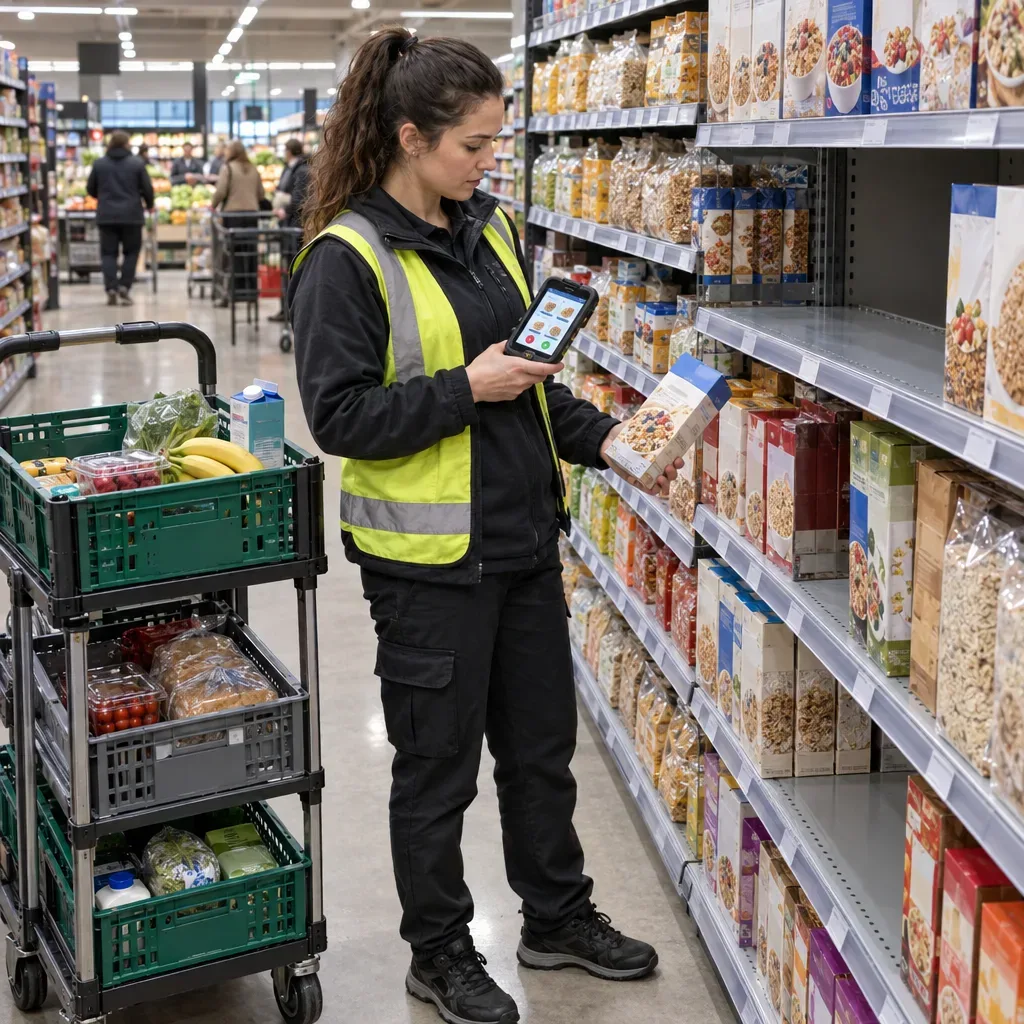
A successful online order starts with a convenient website, but it is also measured by what happens in the store. Pickers need to find dozens of products, check quantities and expiry dates, deal with empty shelves, and get the order ready on time. A single out-of-stock product or outdated information about where it is located can delay the process and hurt the customer experience.
A supermarket order picking system can connect digital orders, product and inventory data, and staff tasks. To get value from it, you also need up-to-date shelf mapping, clear substitution rules, and metrics that balance speed and accuracy. In this guide, we look at how to improve the process, from receiving the order to delivering it.
Start by mapping the order process
Before choosing a system or changing the way you work, it is worth following a few real orders: from when they are received on the site, through task assignment, picking, and handling out-of-stock items, to packing and delivery. That way you can pinpoint the source of delays instead of settling for a general feeling that picking is slow.
Check how many times a picker returns to the same aisle, how much time is spent searching for a product that the system shows as available, and how the customer is contacted when an item is out of stock. Also ask the pickers and the customer service team which recurring decisions slow them down. The answers will help you tell whether the problem lies in the software, the inventory data, or how work is organized in the store.
What should you check in a supermarket order picking system?
A suitable system should show the picker the information needed to do the task and give managers a picture of how the work is progressing. When evaluating solutions, check the actual capabilities and how well they fit the store's existing infrastructure:
Integration with orders, inventory, and POS: What data passes between the systems, how often is it updated, and how are discrepancies handled?
Location mapping: Can products be assigned to aisles and shelves, and can their locations be updated after the store layout changes?
Scanning and verification: Does the system identify a product by its barcode and show the picker the package and variant details?
Handling multiple orders: How are tasks assigned, and how are orders that are picked together kept separate?
Handling out-of-stock items: Can you record the reason for the shortage, suggest alternatives, and track customer approval?
Control and reports: Can you track throughput, accuracy, out-of-stock items, and delivery times using consistent definitions?
Even up-to-date inventory data does not guarantee that the product is on the shelf: it may not have been shelved yet, it may have been miscounted, or there may be some other discrepancy. That is why it is important for the system to let staff report the actual situation, not just display the stock balance.
More efficient order picking with routes and batch picking
A route that fits the store layout
Sorting the shopping list by product location can reduce unnecessary back-and-forth between aisles. Instead of working through the items in the sequence they appear in the order, the picker gets a route that takes the store layout into account. However, an outdated map can achieve the opposite: if a product has been moved to a promotional display or another shelf, the worker will waste time searching for it.
Assign someone to be responsible for updating locations and define when they should be checked, for example after a change to the planogram or when a promotional area is set up. Make it easy for pickers to report a wrong location, so the information can be corrected before it holds up other workers.
Picking several orders on the same route
In batch picking, one worker collects products for several customers in the same aisle. This method may suit small orders or orders that overlap, but it requires control over which item belongs to which order.
You can use a cart with labeled compartments and scan the compartment or order that each product belongs to. Before increasing the number of orders per round, check that the cart is easy to handle and that orders can be kept separate even when there is a substitute, a fragile product, or an item that needs to be kept cold. Saving on walking does no good if it increases the number of products that reach the wrong customer.
Scanning and quality control: not just identifying the product
Barcode scanning helps confirm that the product collected matches the product ordered, but it does not replace checking every important attribute. Similar packages may differ in flavor, size, number of units, or variant. The picker should also check the condition of the packaging and the expiry date in line with the business's procedures.
For weighed products, such as fruit, vegetables, or cheese sold by weight, define how the actual weight is recorded and how it affects the final price. If the customer ordered an approximate quantity, explain in advance how differences between the requested weight and the picked weight are handled.
Before closing the order, add a short checkpoint: Does the number of bags or compartments match the record? Were the substitutions approved according to the policy? Were sensitive products moved to suitable storage? A defined check can prevent follow-up inquiries after delivery.
Substituting out-of-stock products in a supermarket: start with customer preferences
An out-of-stock product doesn't have to end in disappointment, but a substitute chosen without regard for the customer may be more disappointing than the shortage itself. That is why managing order substitutions should start at the purchase stage, not only when the picker reaches an empty shelf.
Set preferences before picking
You can offer the customer the option to approve substitutions, decline them across the board, or set a preference for each product separately. For especially important products, you can let them specify a preferred alternative or mark that no substitution should be made. The preferences should be shown clearly to the picker while they work.
When real-time approval is required, define which channel is used to contact the customer, how long to wait for a reply, and what happens if there is no response. For example, you can decide that the product will not be supplied without explicit approval, or act on a preference the customer set in advance. It is important that the rule is transparent and appears in the ordering process.
How do you choose a suitable alternative?
A product from the same category is not necessarily a suitable substitute. A yogurt in a different flavor, a larger package, or a product from a different brand may be welcomed by one customer and rejected by another. Where allergens, kosher certification, or dietary preferences are involved, the difference may be especially significant.
Check the quantity, price, brand, flavor, and the attributes the customer marked as important. Do not assume a product is safe for a person with an allergy based on the category name alone: check the relevant labeling on the package, and avoid substituting when there is not enough information or the customer has not approved it.
Show a clear price
To make it easier to compare packages of different sizes, show a unit price, for example per kilogram or per liter, alongside the package price. The substitution policy should explain how the customer will be charged if the substitute costs more or less and whether approval is required for the difference. Once the choice is made, show in the order summary which product was substituted and what price will apply.
Chilled and frozen products: plan the waiting time too
Online order picking sometimes includes products that require different temperature conditions. That is why route planning should take into account not only the distance between aisles but also how long the product will wait until delivery. Picking chilled and frozen products close to when the order is completed can reduce how long they are exposed.
After picking, these products should be kept in a suitable area, and transport should be planned too, in line with the manufacturer's instructions and the requirements that apply to the activity and the product. Define who is responsible for moving them to storage, how each item is matched to its order, and how it is brought together with the rest of the bags before delivery.
Which metrics will help you improve the process?
Good measurement shows the full picture: high speed is not a success if orders contain errors or customers reject substitutes. Before comparing workers, stores, or periods, define a consistent numerator and denominator for each metric:
Picking throughput: The number of order lines picked divided by the working hours spent on picking. You can measure units separately, but don't mix units and lines.
Initial out-of-stock rate: The number of product lines not found at first divided by the total number of lines checked.
Substitution approval rate: The number of substitution offers approved divided by the number of offers shown to customers.
Order accuracy: The number of orders delivered without a known error divided by the number of orders checked, using a defined checking method.
On-time delivery: The number of orders delivered within the promised time window divided by the total number of orders delivered in the period.
In addition to the initial out-of-stock rate, separately track lines that were not supplied even after a substitution attempt. This distinction helps you identify whether you need to review on-shelf availability, the matching of alternatives, or the approval process. Also record reported reasons, such as an empty shelf, a product that could not be located, or an inventory discrepancy, and look for recurring patterns. The reports can point you to what to check, but on their own they do not prove what caused the shortage.
How to roll out the process with a pilot
Instead of changing the way all your stores work at once, start with one store or a defined picking window. Measure the current situation, choose a few goals, and train a small group of workers. During the pilot, look not only at the reports but also at how easy the device is to use, the quality of the shelf locations, and how long it takes to get customer approvals.
Train the team using real examples: a product that could not be found despite a stock balance, a substitute at a different price, an order in which the customer declined substitutions, and a weighed product. Define who to contact when the system suggests an unsuitable alternative or when a recurring discrepancy comes to light.
Also check access to personal data: who is allowed to see customer details and preferences, and how the system protects that information. After the trial period, compare the results with the baseline, collect feedback from pickers and customers, and refine the process before expanding it.
Combining up-to-date routes, product verification, and a clear substitution policy lets you manage picking more consistently. The goal is not just to collect an order quickly, but to deliver an accurate order, with the customer understanding what they received and why.
Frequently asked questions
How does an order picking system help a supermarket?
It can connect the digital order, product and inventory data, and the picker's tasks. A route based on product locations may reduce unnecessary walking, provided the shelf locations are up to date.
How do you choose a substitute for an out-of-stock product?
Take into account the customer's preferences and attributes such as price, quantity, kosher certification, allergens, and dietary preferences. It is worth letting the customer approve or decline substitutions and defining in advance what happens if they don't respond.
How do you reduce errors when picking several orders together?
Keep the orders separate using labeled compartments and scanning, and also check attributes such as flavor, size, and the number of units per package. Barcode scanning alone does not verify every relevant attribute.
Whatever your question, the WideCommerce customer service and technical support team is here to give you personal guidance and training in operating the system. The team is available Sunday to Thursday, 09:00–18:00.
Get a quote